Download Finale sheet music editor: what happened and free alternatives
If you got here looking to download Finale, there's something you should know before wasting your afternoon: Finale is no longer sold. MakeMusic, the company that developed it for over 35 years, announced on August 26, 2024 that it was discontinuing sales and updates.
It's not a forum rumor or a delayed version. It's the definitive shutdown of the program: no more sales, no more updates, and a year later, no more official technical support either.
So in this guide we're going to tell you three things, straight up: what Finale was and why it became so popular, what legal options you have today if you really need it, and what free programs you can use to write your scores starting tomorrow without spending a dime.
What is Finale and why half the world was looking for it
Finale is a professional sheet music editor created by MakeMusic for Windows and macOS. For decades it was the standard in Latin America: if you studied music, you definitely saw it on your harmony teacher's computer or in the conservatory composition room.
Schools like Juilliard and Berklee College of Music used it as their flagship program for years, and much of the pedagogical repertoire circulating in PDF on the internet came from there.
Its strengths were real:
- Absolute control over engraving. You could literally move any symbol a millimeter. For complex scores or contemporary music, that had no competition.
- MIDI playback with the Garritan library included, to hear the arrangement before distributing it.
- MusicXML import and export, the format that allows you to move a score from one program to another.
- Complete library of figures, articulations, ornaments and expression marks, including uncommon notation.
And its drawbacks were also real, and fairly well-known:
- The learning curve was steep. Nobody masters Finale in a week.
- Bar lines and system breaks rarely ended up where you wanted them without manual adjustment.
- In anacrusis measures it placed rests poorly and you had to correct them one by one.
What exactly happened: Finale's closure in 2024
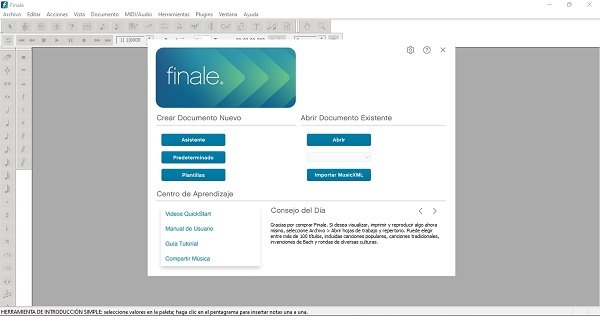
On August 26, 2024, MakeMusic published the announcement nobody expected: Finale is being discontinued. Along with it, Finale PrintMusic and Finale NotePad, the reduced and free versions, were also withdrawn.
The specific points of the announcement were:
- It stopped selling that same day on MakeMusic's official store. There's no new version, no upgrade, no new license to buy.
- There will be no more updates. The last version was Finale v27 (v27.4), released in late 2023. It's frozen there.
- Official technical support ended one year after the announcement, in August 2025.
- MakeMusic recommended migrating to Dorico, Steinberg's notation program, and partnered with them to offer a special switching price to Finale users.
There was one detail that was corrected thanks to community complaints: initially it was said that starting in August 2025 you wouldn't be able to authorize the program anymore. After protests from thousands of users, MakeMusic announced that the authorization system will remain active indefinitely. That is: if you bought Finale at some point, you can keep installing and authorizing it.
An important note for those who already have it: if you deactivate your license on a computer after 30 days of having installed it, the program immediately stops printing and saving. Think twice before touching deactivation.
How much Finale cost and how much it costs today
For reference: Finale v27 cost $600 in its full version. The academic license was around $350, and there was a student price close to $99.
Today that price is history, because it can't be bought. Neither expensive nor cheap: the official store closed that product and MakeMusic doesn't authorize license transfers between people, so there's no legal second-hand market either.
If you see "Finale license" offers on key resale sites, be very careful: without the ability to register the license in your name, what you're buying is useless to you.
How to get Finale legally today
If you already bought Finale at some point
Good news. Log into your MakeMusic account with the email you used when you bought it: from there you can re-download the installer for your version and authorize it. It continues to work on computers that can run it.
Our advice, musician to musician: keep a copy of the installer on an external drive or in the cloud. The day those servers cease to exist, that copy will be all you have.
If you never had Finale
Then, simply, Finale is no longer an option for you. There's no legal way to get it, and even if there were, you'd be buying a program that won't receive a single correction again and that in a few Windows or macOS versions simply won't open.
The official successor is Dorico, by Steinberg. It's sold in three tiers:
- Dorico SE: free. Up to 2 staves. Enough for voice and piano, melody with chords or harmony exercises.
- Dorico Elements: around $99. Up to 24 staves. Plenty for band arrangements, choir or small group.
- Dorico Pro: around $580. Unlimited staves, with all professional engraving tools.
Steinberg also maintains crossgrade prices for anyone coming from Finale and a free version for iPad. It's worth checking the current price before deciding, as it changes by region and promotions.
An honest warning about the installers floating around out there
When a program disappears, installation packages of unknown origin always start circulating on the internet. We don't recommend them, and not for moral reasons:
- They're the favorite vehicle for cryptocurrency miners, password theft and ransomware. A sheet music editor shouldn't ask you to disable antivirus.
- There's no support, no updates and no one to complain to if your project gets corrupted two days before the concert.
- If you ever publish or sell your arrangements, you're building your work on a foundation that doesn't belong to you.
With the free alternatives available today, honestly, it's not worth the risk.
The free alternatives you can download (or open) right now
1. MuseScore Studio: the natural heir
If you're looking for the most direct replacement for Finale, it's MuseScore Studio. It's free, open source, and works on Windows, macOS and Linux. It has no paid version, no staff limit, no watermark on PDFs.
What it offers you:
- Writing with your computer keyboard or with a connected MIDI keyboard.
- Playback with included sounds and export to PDF, MIDI, MusicXML, MP3 and WAV.
- Imports MusicXML files, so you can bring your scores from Finale without rewriting them.
- A huge community, with tutorials in Spanish everywhere.
It's easier to learn than Finale and, for 90% of musicians, does exactly the same thing. You download it from the project's official website, musescore.org.
2. LilyPond: for those who want impeccable engraving
LilyPond is also free and open source, but it works differently: instead of dragging notes with the mouse, you write the music in text and the program engraves it for you.
It sounds strange at first, but the result is of a typographic quality that many consider superior to any commercial editor. It's the favorite of independent publishers and those preparing critical editions.
The downside is obvious: the learning curve is steep and it's not the ideal tool if what you want is to get an arrangement quickly for Saturday's rehearsal.
3. Our online sheet music editor: no installation needed
And here's the quickest option of all, especially if you arrived looking for Finale because you need to write one score and not set up a recording studio.
At Full Partituras we have a free online sheet music editor that works directly in your browser. It doesn't download, it doesn't install and it doesn't take up space on your disk: you open the page and start writing.
With it you can:
- Write notes, rests, dots, ties, accidentals and complete articulations (staccato, accent, tenuto, fermata, trill, mordent, turn, 8va).
- Transpose the score up or down with a click.
- Connect your MIDI keyboard and write by playing, instead of click by click.
- Listen to the result before printing.
- Export to PDF, MIDI, WAV and SVG image, and print directly.
- Import MusicXML: if you have scores exported from Finale, Sibelius or MuseScore, you open them and keep working right there.
It works on computer and mobile, and you don't have to wait for any 2 GB download. For a lead sheet, a class exercise, a short arrangement or an idea that came to you at midnight, it's the shortest route that exists.
Quick comparison
| Program | Price | Installation | Ideal for |
|---|---|---|---|
| Finale | Discontinued | Only if you already have a license | Finishing old projects |
| MuseScore Studio | Free | Windows, macOS, Linux | Direct Finale replacement |
| LilyPond | Free | Windows, macOS, Linux | Maximum quality editions |
| Dorico SE | Free (2 staves) | Windows, macOS, iPad | Try the official successor |
| Full Partituras Editor | Free | None, runs in the browser | Write today, no waiting |
What to do with your .mus and .musx files
This is the most common question we get, and it has a solution. Finale files use the extensions .mus (old versions) and .musx (since Finale 2014), and no other program opens them directly.
The bridge is MusicXML. If you still have Finale installed and working, do this before anything else:
- Open each score in Finale and go to File > Export > MusicXML.
- Save the .musicxml file next to the original.
- If you have lots of scores, Finale includes batch processing that saves you opening them one by one.
With that .musicxml in hand, your music is now portable: you open it in MuseScore, in Dorico, in LilyPond (through a converter) or directly in our online sheet music editor.
Do it now, not the day your computer dies. It's half an hour of work that saves you rewriting years of arrangements.
So, what's best for you?
If you're a student or amateur musician: MuseScore Studio, no doubt. It's free, it's powerful and there are Spanish tutorials for everything. And for quick stuff, our online editor.
If you're a professional arranger or copyist: take a serious look at Dorico. It was designed by much of the original Sibelius team and is the path that MakeMusic itself recommended.
If you only need to write one score today: don't install anything. Open the Full Partituras sheet music editor, write, export to PDF and you're done.
If you still have Finale working: use it easily, but export everything to MusicXML this week. The program won't break tomorrow, but it won't improve ever again.
Finale left a mark on several generations of musicians and deserved a better goodbye. The good news is that today, for the first time, free tools are up to the task: you can write professional-level music without paying $600 for a license.
If you want to keep comparing, take a look at our guide to the best sheet music editors. And if you're going to finish a project in Finale, we have the tutorial on how to write measures in Finale.
15 Comments


Saludos

Saludos


Por ahora tenemos solo windows.
Saludos

Saludos
Saludos